Install ConvertFlow on your Shopify store instantly. Target visitors by cart data and more.
Connect For FreeYou already segment your email and SMS lists down to the product someone viewed. Then every click lands on the same homepage or collection page as a cold visitor from a Meta ad. Landing page personalization closes that gap: the page changes based on who's arriving and what you already know about them. This guide covers the segments worth personalizing for on Shopify, the ways to do it, and how to prove it's working.
Personalization means changing what's on the page (headline, products, offer, social proof, the next step) based on a rule about the visitor. On Shopify that can be as simple as a different hero for Meta ad traffic or as involved as a results page built from someone's quiz answers and purchase history. In the funnels we build for Shopify brands, the biggest gains rarely come from clever algorithms. They come from not showing a returning subscriber the same "10% off your first order" banner they've already used.
UTM parameters and referrers tell you which ad, creative or influencer sent the visitor. Match the landing page headline and hero products to the ad's promise. This is the most common form of personalization for paid social, and the easiest to set up.
Traffic from your own email and SMS is the highest-intent traffic you have, and you already know who it is. Pass an identifier in the link (for example a klaviyo_id parameter carrying the Klaviyo profile ID) so the page can recognize the subscriber, skip the email capture they've already completed and show content for their segment.
Zero-party data from a quiz is the most direct signal of what someone wants. Use it to build a personalized results page, and to change what returning quiz takers see across the site.
First-time visitors, cart abandoners, first-time buyers and repeat customers need different pages. Customers should see replenishment, upgrades and bundles, not acquisition offers.
Country, region or city can change shipping messages, currency, stock availability or local social proof. For Shopify Plus brands running expansion stores, location also decides which store's products a page should show.

Build a separate page for each high-value segment: one per ad angle, one for email traffic, one for each quiz outcome. It's the most controllable approach and the easiest to measure. The cost is page sprawl, so keep it to segments with real traffic. A landing page builder that connects to your Shopify catalog makes this practical without a developer.
Instead of new pages, swap sections on your homepage, collection or product pages: a different hero for returning customers, a recommendations row based on quiz answers, a bundle offer for high-AOV segments. This keeps SEO and navigation intact. Shopify's theme editor isn't built for rule-based content, so most brands use a personalization tool that embeds sections or conditional rows into the theme.
Popups are the lightest-weight option and often the first one brands try: a returning-subscriber message instead of a signup offer, a cart-value nudge, a quiz prompt for undecided browsers. See our comparison of Shopify popup personalization software for the tools that do this well.
Shopify Plus brands tend to hit the same limits: several expansion stores, large catalogs, teams that can't wait on theme releases, and enough traffic that small lifts matter. When evaluating Shopify Plus personalization tools, check that the tool:
Enterprise testing suites and recommendation engines cover parts of this; a conversion platform covers others. Our comparison page lays out the tradeoffs.
Personalized pages feel like they should win, and sometimes they don't. A tailored hero can lose to a strong generic one if the segment is small or the copy is weaker. Keep a control group on every rule, judge on revenue per visitor and average order value, and give tests enough traffic to settle. Our A/B split testing page covers how we run funnel experiments.
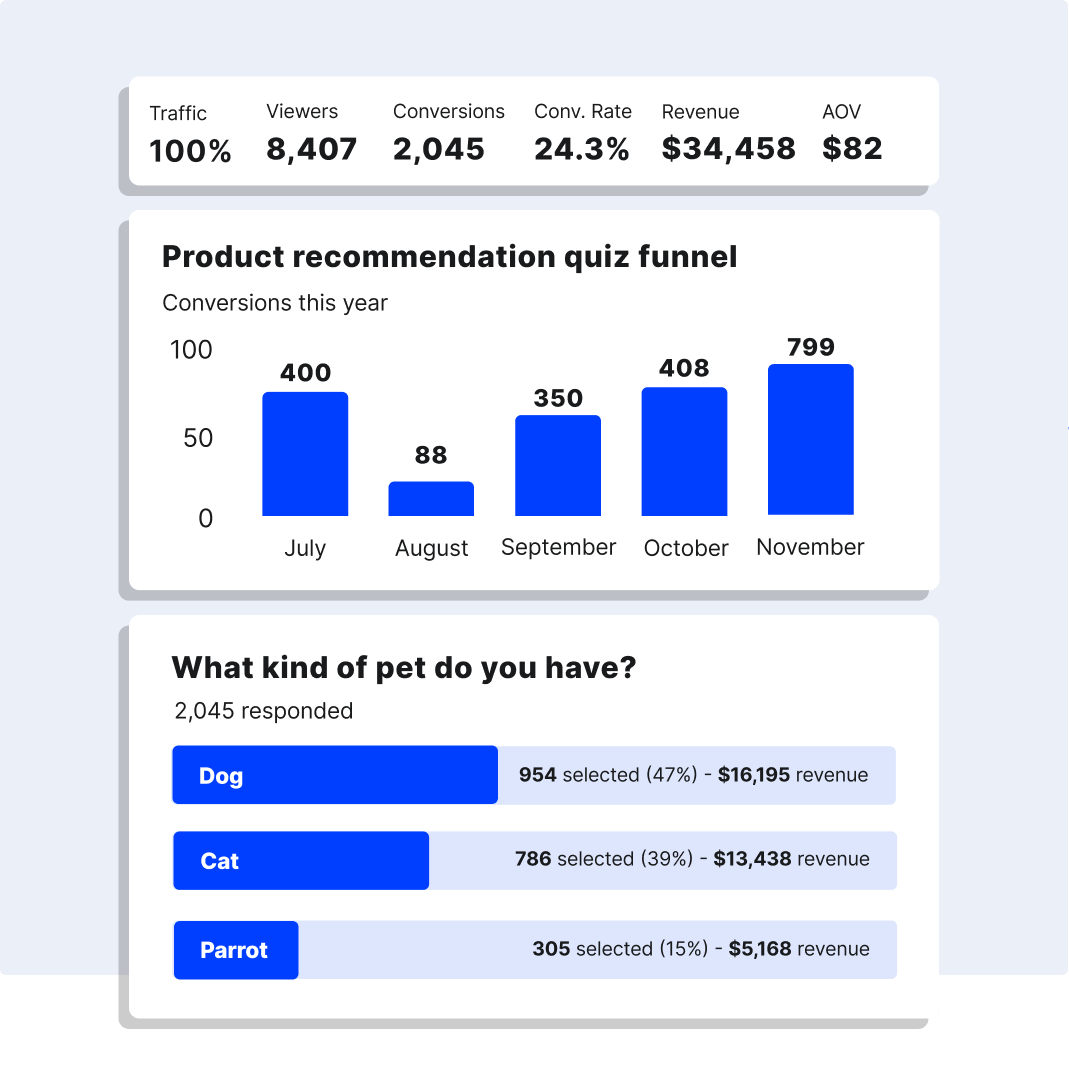
ConvertFlow is a full-funnel conversion platform for Shopify brands. You can build landing pages, embedded sections and popups, and personalize them by page, referral source, location, site activity, cart activity, quiz and survey answers, and segments from connected tools like Klaviyo, HubSpot and Shopify. Returning Klaviyo subscribers can be identified from email and SMS clicks, and quiz funnels feed product recommendations and bundles. ConvertFlow AI drives agentic funnel experimentation across the full funnel, with automated A/B testing for landing pages, popups, quiz funnels and site content. TrueDark reports a 21% lift in average order value from its ConvertFlow quiz funnel compared with its Shopify store.
Honest limits: targeting by CRM data is on the Pro plan, as is full-funnel A/B testing (Personal and Prime include funnel variants), full-funnel builds take more setup than a single popup, and pricing scales with monthly funnel views. See website personalization for the details.
Pass a subscriber identifier in your email and SMS links (Klaviyo can append the profile ID with UTM tracking), then use a personalization tool that recognizes the visitor and changes the headline, products and offer based on their segment or properties.
Conversion platforms like ConvertFlow, popup tools with segment targeting, recommendation engines and enterprise testing suites all do parts of this. Compare them on which data they can read, where they can change content, and whether they A/B test.
No. Most personalization tools work on any Shopify plan. Plus brands mainly need multi-store support and higher traffic limits.
Save quiz results as properties in your email/SMS platform, link to the results page in your flows, and include the subscriber's ID so the page rebuilds their recommendations.
It can. Check how each tool loads (script size, server-side vs client-side rendering) and watch Core Web Vitals after launch.
Free to install with powered-by links. Paid plans start at $29/mo for 10k monthly views, $99/mo for 30k views and CRM integrations, and $299/mo+ for 100k+ monthly views.
Create a free ConvertFlow account and integrate
Shopify
in minutes.
Install ConvertFlow on your Shopify store instantly. Target visitors by cart data and more.
Connect For Free