


Playbook summary
Sell a personal styling subscription, not a single item. A shopper answers four quick questions about how they shop, what they wear, and their fit, saves their spot with email and phone, sees their style profile, then lands on one style guide with their style, a stylist’s picks, the first-box offer, a free-gift bar, and FAQs.
- Industry:Ecommerce
- Metrics affected:AOV; Order Rate; Subscriptions
- Campaign type:QuizzesLanding Pages
Tools you'll need
- Funnel builder: ConvertFlow
- Ecommerce platform: Shopify (required; product elements show placeholders until it’s connected)
- ESP and SMS: Klaviyo, Attentive, Postscript, or equivalent (not in the template; connect it on the email and SMS steps)
Quick setup
- Content: 4 questions (shopping priority, clothing types, height, weight) inside one quiz element
- Call-to-action: Save your spot, see your style picks, then schedule your first box
- Targeting: Dedicated landing-page URL for ads, social bio links, nav, and email
Use this template to sell a personal styling subscription, not a single item. A shopper answers four quick questions about how they shop, what they wear, and their fit, saves their spot with email (and optionally SMS), sees their style profile, then lands on one style guide with their style, three of a stylist’s picks they can add in one click, the first-box offer, a free-gift bar, and FAQs.
That path is a personalized shopping funnel: the shopper tells you how they shop and what they wear, gets a style profile and a stylist’s picks, and starts their first box, with email and SMS follow-ups personalized from their quiz answers.
Styling subscriptions like Stitch Fix and Trunk Club built their businesses on a style quiz. Shoppers don’t want to scroll a catalog; they want someone to pick for them. The quiz is how you earn that trust: a few questions about priorities, wardrobe, and fit, and the shopper sees picks that feel chosen for them instead of a collection page.
An email gate sits before the results, so you keep the subscriber even when they don’t check out.
Performance benchmark
A typical Shopify store converts 1.4–2.6% of sessions into orders (based on Littledata’s and Shogun’s benchmarks).
Based on ConvertFlow’s September 2026 Product Quiz Funnel Benchmark, sampled across 2,120 ConvertFlow product quiz funnel campaigns, active Shopify product quiz funnels engage 44.2% of visitors, turn 5.2% of quiz viewers into orders, and earn $9.43 in attributed revenue per view on average. Orders placed through the quiz average $264.
Basket size matters. Directionally, stores with a $150+ AOV see a median 60.6% quiz engagement and $13.49 per view, while stores under $50 see 15.6% and $0.24. A first box of several pieces plus a styling fee is a high-consideration purchase, which is where a guided quiz helps most. Measure your funnel against your own AOV band.
ConvertFlow customers see it in their own numbers:
- May Lindstrom Skin lifted AOV 49% with personalized bundle offers from a quiz funnel
- Snyder’s Furniture lifted AOV 59% with a quiz funnel
- Pease Doors lifted AOV 38% with a product quiz funnel
- Haus Labs drove a 16% purchase rate with a quiz
Core principles
Sell the box, not the item: The quiz exists to replace browsing with a stylist’s picks. The style profile names their look; the three picks show what’s coming; the first box is the offer. If every answer combination shows the same pieces, you haven’t personalized anything.
Keep the quiz short and fit-focused: This template asks four questions: what matters most, what they wear, height, and weight. That’s enough to pick a style and a fit without turning the quiz into a full style profile. Collect sizes, budget, and brand preferences after the first order, inside the subscription.
Don’t split data collection from the sale: The same path that builds the style profile must write answers into your ESP as custom fields or profile properties, add the subscriber to a list, and fire a quiz-completed event. If the ESP isn’t connected, the funnel isn’t live.
Eliminate dead ends: After the style guide, the shopper adds the picks or schedules their first box. A “your stylist will be in touch” page with no product and no checkout is a failed activation.
Execution strategy
Lead with the outcome: Step 1 is a landing intro: “A wardrobe that finally feels like you. Take the style quiz. A personal stylist hand-picks 5 pieces and ships them to you. Keep what you love, return the rest — free.” Button: Take the style quiz.
The funnel is 6 campaign steps:
- Intro (one step): headline, subhead, Take the style quiz button, lifestyle image
- Quiz (one step, 4 questions inside one quiz element): shopping priority, clothing types, height, weight
- Email gate: “Let’s get to know you. We’ll start by saving your spot — then dive into your style.” First name, email, consent. Button: Save My Spot
- SMS: “Get style alerts by text. Want your personalized style picks sent to your phone?” Phone with country code and SMS consent. Button: Subscribe For Texts. Link: No Thanks
- Style profile (one step): “Your style profile is ready!” Personalized line, recap of what matters most, clothing types, and height. Button: See My Style Picks
- Style guide (one step): style profile card, three picks with Add All To Cart, styling fee and box details, free-gift bar with Schedule My First Fix, reviews, FAQs
Gate the picks, then make the offer: Email and SMS come after the quiz and before the style guide. Benefit copy on the buttons (“Save My Spot”, “See My Style Picks”), not “Submit.”
Use quiz answers for follow-up: Send answers into your ESP so the welcome flow leads with their style. A shopper who picked “Saving time” and “Business casual” hears about a work wardrobe their stylist builds for them, not a generic new-arrivals email.
Pro tips
Keep the CTAs benefit-driven. Template buttons are “Take the style quiz”, “Save My Spot”, “See My Style Picks”, and “Schedule My First Fix”. Do not change them to “Submit” or “Sign up”.
Name their style. The style card (“Modern Classic” in the template) is what makes the result feel personal. Write 3 to 5 style profiles and show the right one with conditional rows based on shopping priority and clothing types.
Consider sizes instead of weight. Weight is a sensitive question and a weak fit signal. If your stylists work from sizes, swap question 4 for tops and bottoms size, or make it optional.
Make the subscription terms clear before checkout. Show the styling fee, how often boxes ship, and how to skip or cancel before the shopper commits. Many states have automatic renewal laws that require it, and clear terms reduce chargebacks.
Launch as a dedicated landing-page URL so ads, social bio links, nav, welcome popups, and your ESP can all point at one style quiz. Popups and embeds come after this URL works.
Do not invent extra steps. The style guide is one scroll, not “profile” plus “picks” plus “checkout” as separate steps.
Quick setup
1. Start with the Personal Stylist Subscription Quiz template
Do not build from a blank canvas. Use our quiz funnel template for this.
Open the template, click Use This Template, keep the 6-step structure. Use AI to remix the logo, colors, the images, and copy. Use your own styled outfits, not stock photos. The campaign is a landing page. It is not a popup and it is not one step per question.

What you should see in the builder: 6 steps. Step 2 holds one quiz element with 4 questions. If you see yourself adding steps for each question, stop.
2. Set up the quiz questions
The 4 questions in this template, in order, all live in one quiz element. The single-select question auto-advances; multi-select and number questions show Continue. Suggested custom fields: shopping_priority, clothing_types, height, weight.

1. When shopping for clothes, what’s most important to you? Single-select: A good fit / Saving time / Updating my wardrobe / Improving my style

2. What types of clothes are you looking for? Multi-select: Casual / Business casual / Night out / Active / Leisure / Special occasions

3. How tall are you? Number input (in)

4. What’s your weight? Number input (lbs)
Swap the labels for your styling service, but keep question 1 about what the shopper cares about and question 2 about what they wear. Those two answers pick the style profile and the picks. Map each question to its custom field so answers land in ConvertFlow and in your ESP.
Set readable answer values: double-click an answer to open its settings. Each answer has a label, which the shopper sees, and a value, which is stored in the custom field and shown in merge tags and the recap on step 5. Change values to the words you want in the recap, your ESP segments, and your product filters.
.avif)
3. Connect your ESP on the email step

Go to step 3 (the email gate). Select the form. Actions: connect Klaviyo or your ESP if it isn’t already. Then add automations:
- Add to list or audience (your quiz or main list)
- Write quiz answers to custom fields or profile properties
- Track a quiz-completed event
In the builder: select the form, open the Actions tab, click to add or manage integrations, find your ESP, and click Connect. Then scroll to Automations and click Add Automation, for example “Klaviyo – Add to list”.
.avif)
Form in the template: first name, email, email consent, Accept privacy policy and terms of service. Headline: Let’s get to know you. Subhead: We’ll start by saving your spot — then dive into your style. Button: Save My Spot.
If this step is skipped, the trial is not activated. Activation is ESP connected plus at least one billable action (list, field, or event). Preview will not fire automations. That is expected. The connection still has to exist.
4. Connect SMS on the SMS step

Step 4 asks for a phone number with country code and an SMS consent checkbox. Headline: Get style alerts by text. Button: Subscribe For Texts. Link: No Thanks. Add an automation to subscribe the phone to your SMS list (Klaviyo SMS, Attentive, Postscript, or equivalent), and update the consent text with your brand name.
5. Set the style profile step

Step 5 in this template is one screen:
- Headline: Your style profile is ready!
- Personalized line: “{first name}, based on your preferences, we’ve matched you with a personal stylist and curated picks just for you.” Set a fallback first name (for example “friend”)
- Recap: What matters most, Clothing types, Height (they show “Not specified” in the template preview)
- Button: See My Style Picks
Keep weight off this screen. The recap reads the stored answer values, so fix them on the answers in step 2 rather than here.
6. Connect Shopify and build the style guide

Connect Shopify under Integrations, then return to step 6. The style guide is one scroll:
- Eyebrow: Your Style Guide. Headline: A wardrobe, designed for you. Subhead: A personal stylist will hand-pick five pieces tailored to your fit and taste — try them on at home, keep what you love
- Style card: “01 / Your style: Modern Classic. Timeless silhouettes refreshed with elevated details — versatile pieces that work as hard as you do.” Show a different style per answer combination with conditional rows
- Picks: the products feed capped at 3, each with a 25% OFF badge and Add To Cart, plus Add All To Cart (products show empty until Shopify is connected)
- Box details: $20 styling fee, credited to your order / 5 pieces in your first fix / Free shipping & returns (use your real terms)
- Free gift: “Upgrade your Fix and get a free gift.” Progress bar with the amount left and a Schedule My First Fix button. Set your threshold and point the button at your subscription checkout
- 3 review cards (marked Sample, with video placeholders; replace them with real customer reviews or remove them)
- FAQs: How is my style profile personalized for me? / What is the return policy? / Can I retake the style quiz?
How the product settings work
Choose the product source: select the product hero or products feed, then pick the source. Use your connected Shopify store, or ConvertFlow custom products for a plan or bundle SKU you’ve set up separately.
.avif)
Add conditional recommendations per answer: click to add a conditional product recommendation, add conditions based on quiz answers (ALL or ANY must match), then set which products show for that condition. Do this on the hero and on the add-ons feed so both change together. No separate campaigns or steps are needed for each plan.
.avif)
.avif)
Or let the quiz pick the products: the Quiz Auto Recommendation filter uses submitted answers and custom fields to filter your catalog automatically. Exclude questions that shouldn’t affect the products, like height and weight.
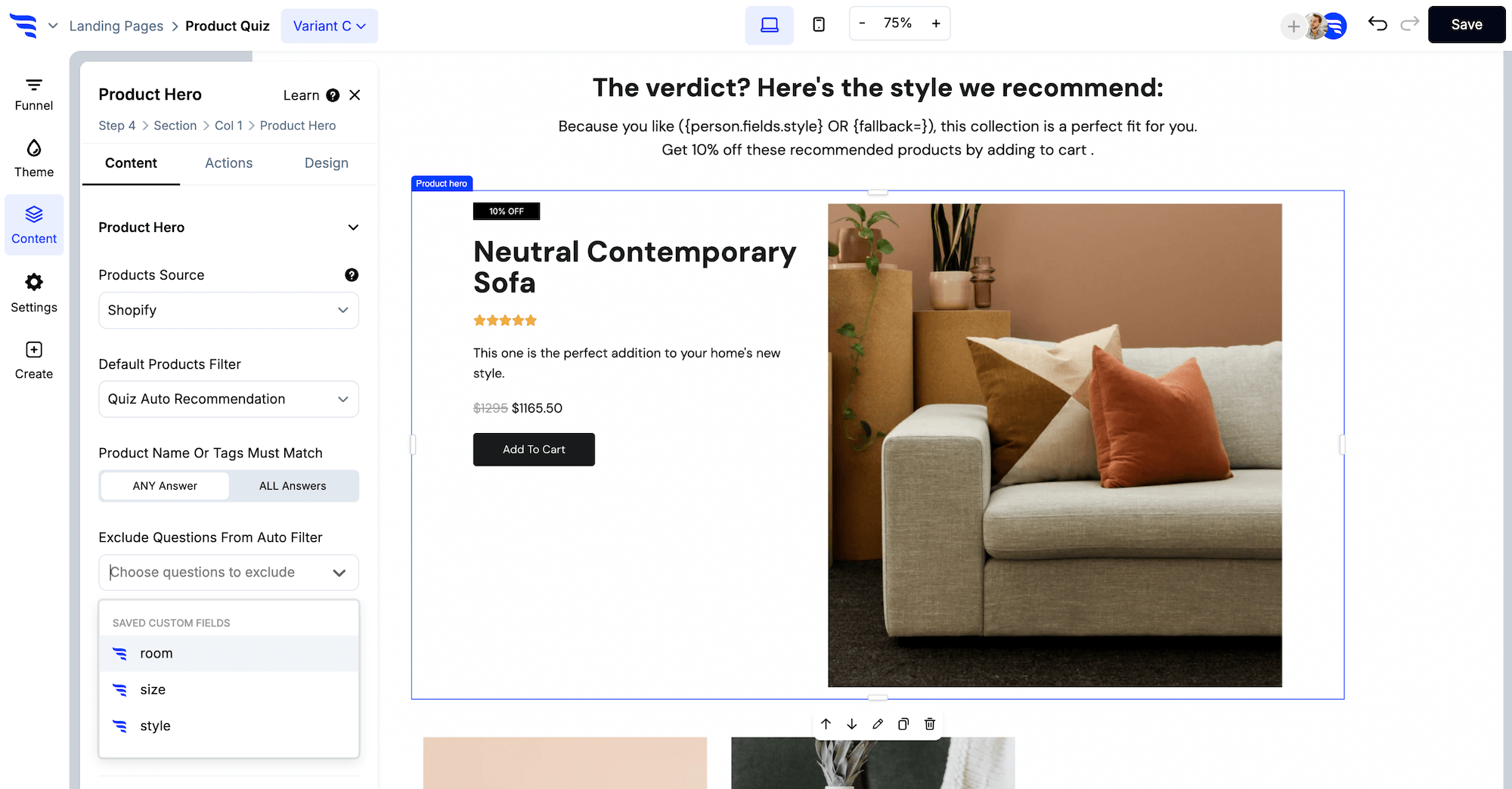
Cap the add-ons at 3: in the products feed’s design settings, set the maximum number of products to 3.
.avif)
Don’t split the style card, picks, gift bar, and FAQs into separate steps. Keep it as one personalized page (you’ll link back to it from email and SMS).
7. Launch the URL, then preview the full path
Set the landing page domain and path. Save. Preview the whole funnel: intro, questions 1 through 4, email, SMS, style profile, style guide.
.avif)
Confirm:
- 6 campaign steps
- First name merges into the style profile line, with a fallback when empty
- Recap shows readable values, not stored keys
- Forms submit (automations won’t run in preview), and No Thanks skips SMS
- Real products show in the picks, not placeholders
- Different answers produce different style cards and picks
- Styling fee, box size, and return terms match your offer
- Add All To Cart and Schedule My First Fix both work
- Sample reviews replaced or removed
- No thank-you dead end
Then activate. In the dashboard, watch completion, answer mix, attributed orders, and AOV against the benchmark for your AOV band.
In the dashboard: you can see how many visitors progress through each step, which answers they pick, and the orders, revenue, and AOV attributed to each answer.
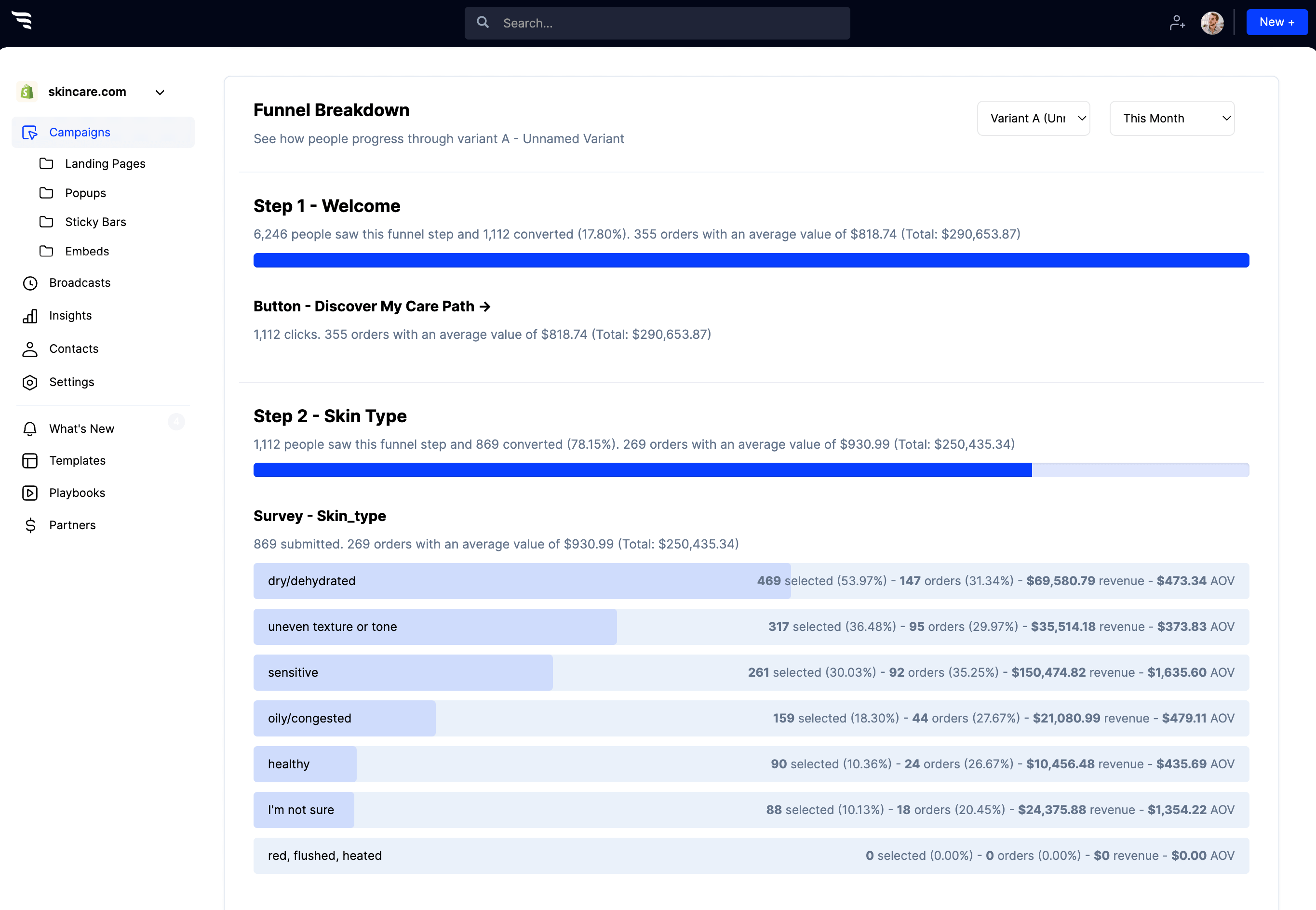
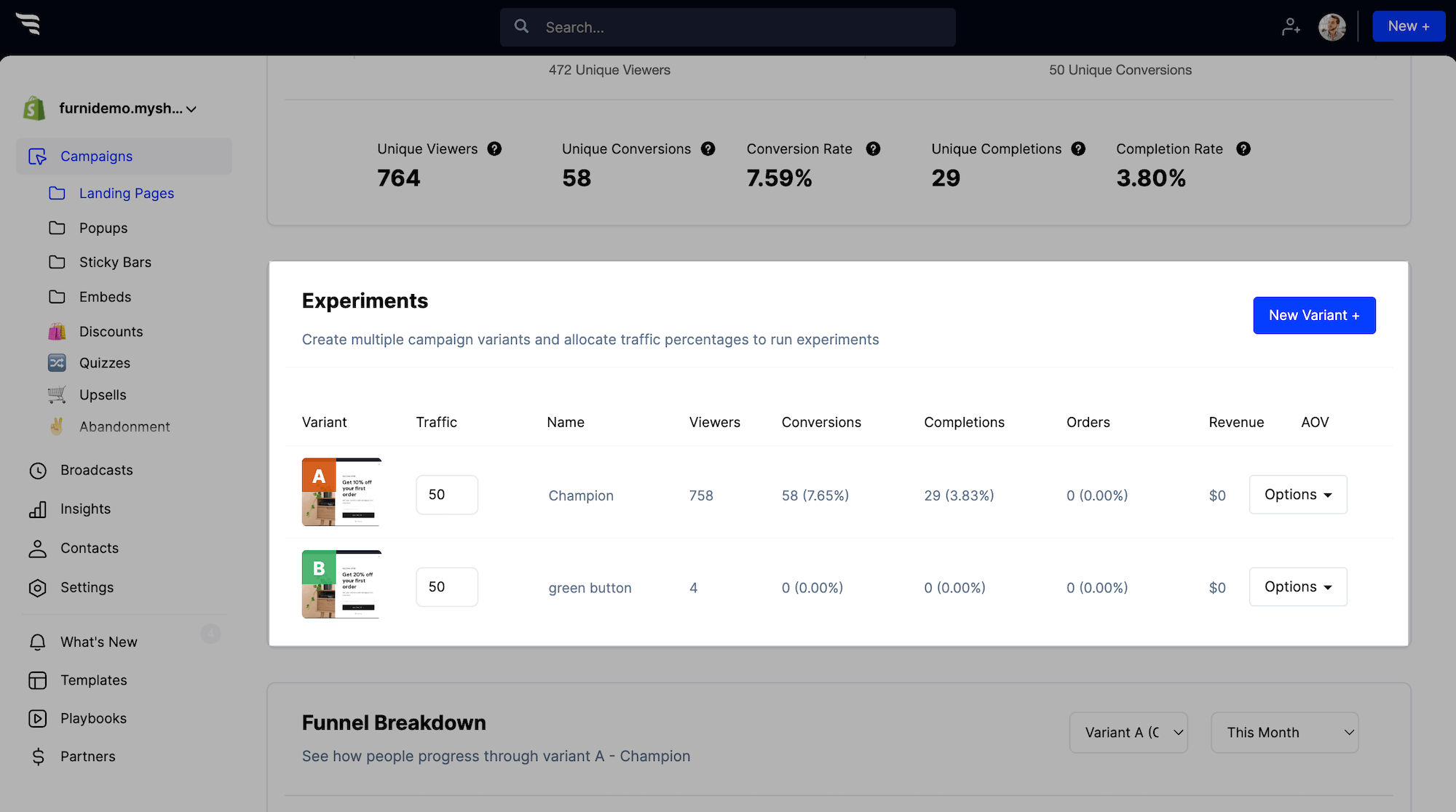
Then split-test: once you have orders, test the weight question vs. a size question, the styling fee offer, and how many picks you show.
Follow up with personalized email and SMS flows
Most quiz takers won’t schedule their first box on their first visit. Their style profile is the best follow-up you have.
8. Build a quiz follow-up flow in your ESP
Trigger it off the quiz: start the flow from the quiz-completed event or the list from step 3. Exit anyone who orders.
Split by answers: use conditional splits on shopping priority and clothing types. A “Saving time” shopper hears how little effort a box takes; an “Improving my style” shopper sees looks their stylist would put together.
- Email right away: their style profile and the link back to their style guide
- Email a day later, if they haven’t ordered: how a box works, the styling fee credit, and free returns
- SMS for shoppers who opted in: a short reminder with the same link
- For customers: a note from their stylist before each box ships
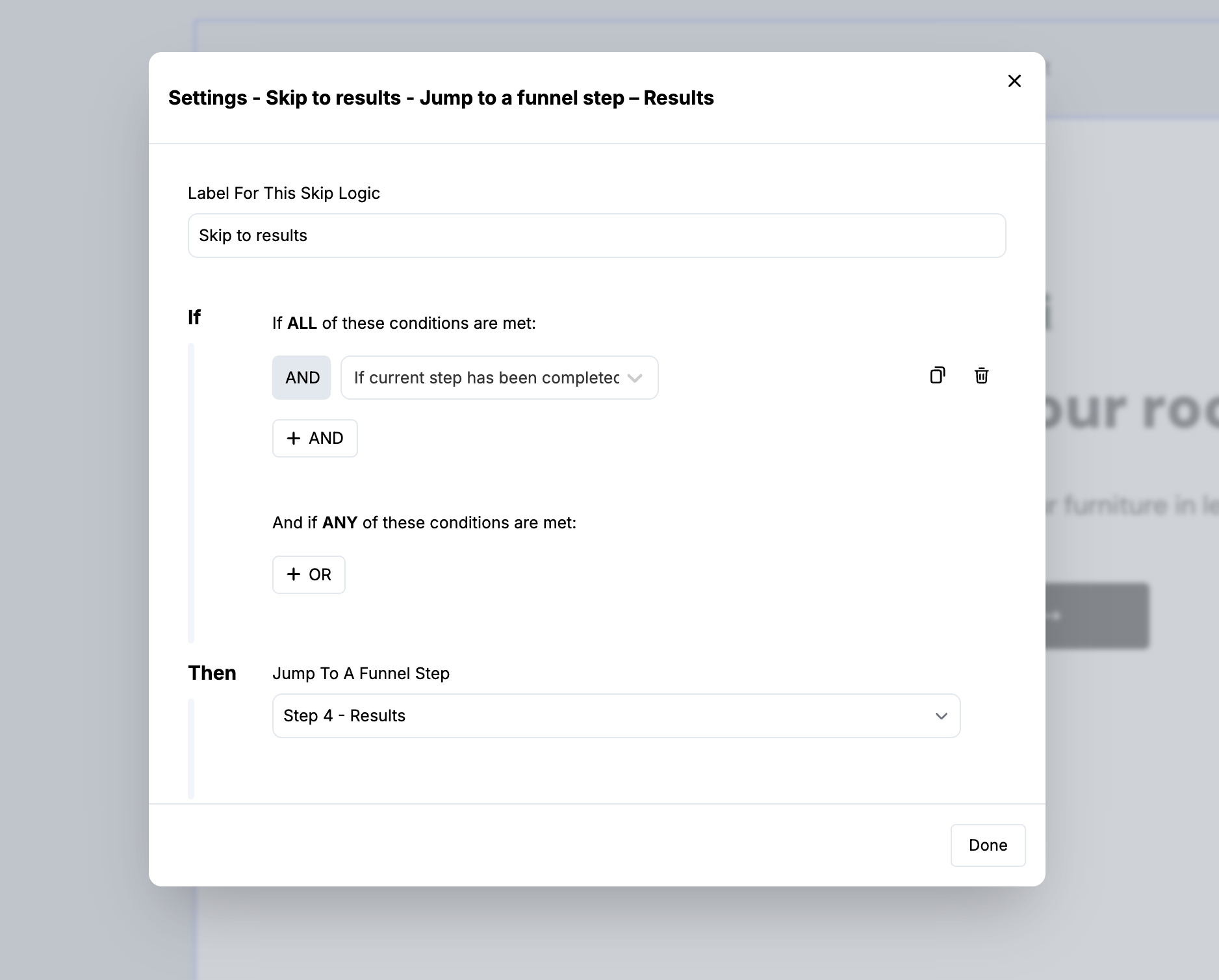
9. Skip returning visitors straight to their results
Without skip logic, someone who clicks back from email lands on the intro and has to retake the quiz. Skip logic checks each visitor when they reach a funnel step and jumps them to the right one.
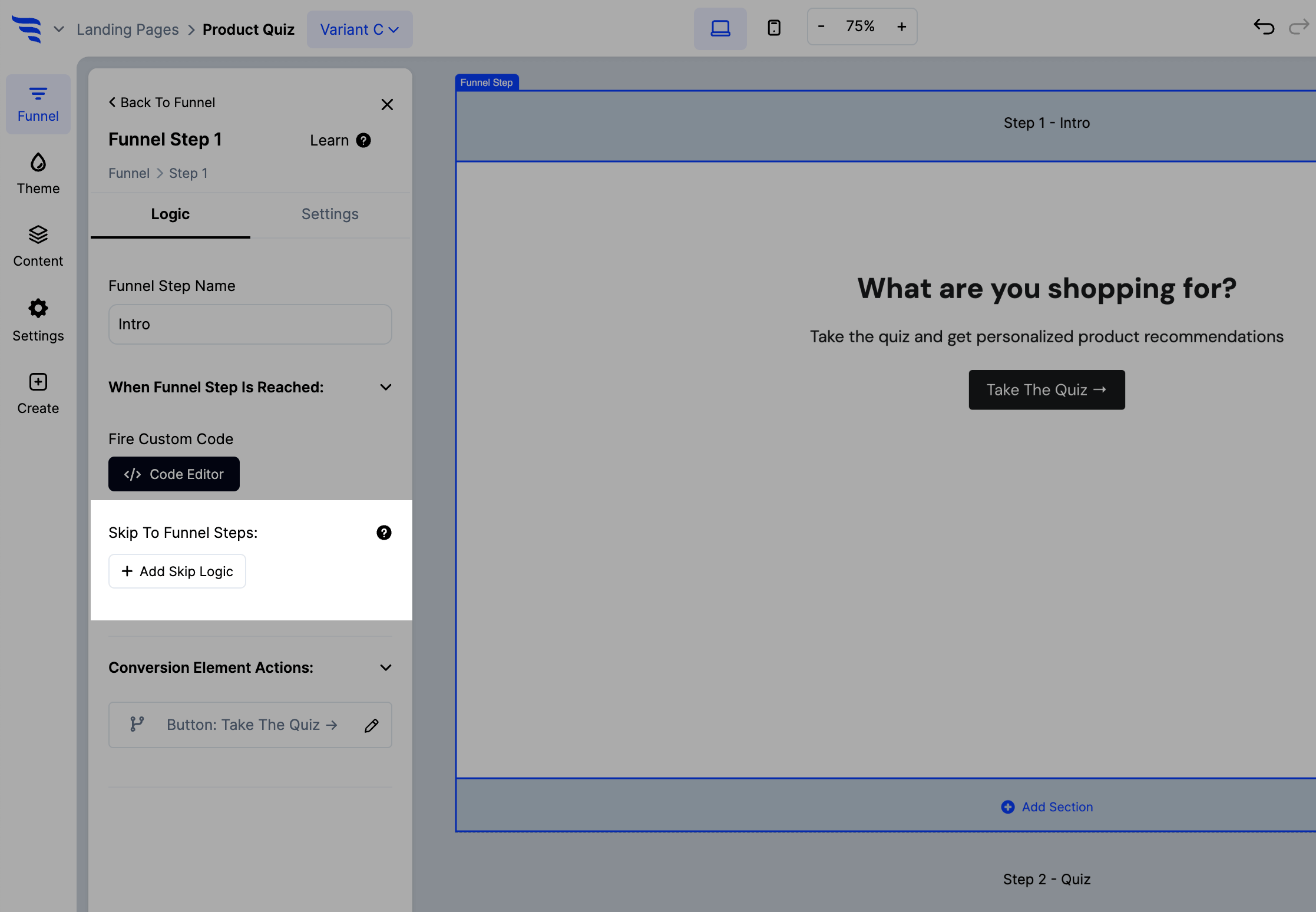
In the builder: click to manage your funnel, edit the intro step, and click + Add Skip Logic. Add the condition that the visitor has already completed the quiz, then under Jump To A Funnel Step choose the results step. Add the same logic to the email and SMS steps so a known subscriber never sees the form twice.





.svg)
